





How does Amazon Fire TV built-in enhance the 2027 Chrysler Pacifica for Berryville, VA families?
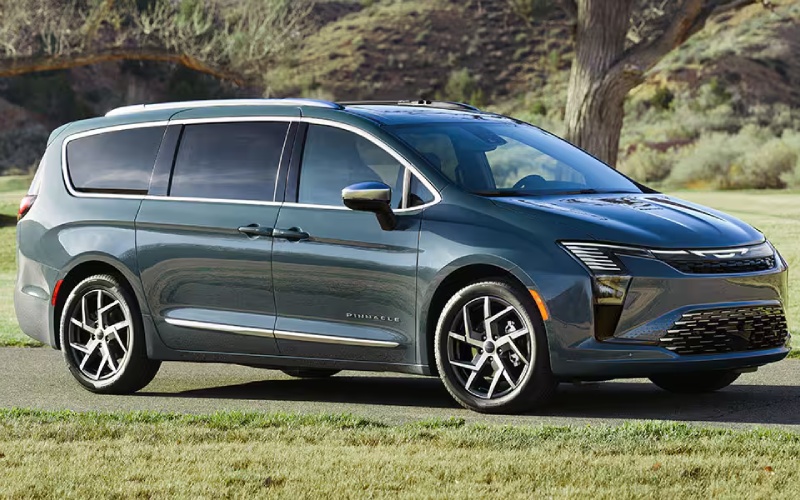
Marlow Motor Company - How does Amazon Fire TV built-in enhance the 2027 Chrysler Pacifica for Berryville, VA families?
The 2027 Chrysler Pacifica takes family travel seriously, and few options prove that more clearly than the available Theater Group with Amazon Fire TV built-in. If your crew splits time between school runs, practices, and weekend getaways around Berryville, VA, the ability for each backseat passenger to watch their own shows, movies, or play games on dual 10-inch HD touchscreens can transform long days into easy rides. Beyond entertainment, this setup brings a sense of calm and choice to the cabin—both priceless when schedules get tight and energy levels run low.
Below, we will break down how Amazon Fire TV built-in works in the Pacifica, how it pairs perfectly with the Uconnect® 5 system and available FamCAM™ Interior Camera, and which families will benefit most from adding the Theater Group. By the end, you will have a clear picture of what life looks like with streaming content, kid-friendly visibility, and responsive controls all designed with parents and caregivers in mind.
What Amazon Fire TV built-in means in a family vehicle
In the available Theater Group, both rear screens are true entertainment hubs with Amazon Fire TV built-in. That means each passenger can access a wide range of apps, shows, and games right on their display—and do it independently, so one child can watch an animated series while an older sibling catches up on a different show. The Pacifica’s thoughtful setup lets the screens operate separately, which helps avoid the one-show-for-all compromise that often creates friction on longer drives.
This system complements the Uconnect® 5 10.1-inch touchscreen up front. Parents can handle navigation, music, and settings easily, while passengers enjoy their content in the back. The result is a cohesive experience: information and controls where the driver needs them, entertainment and choice where passengers want them.
How it fits real life around Berryville, VA
For families heading to Jim Barnett Park, commuting along Route 7, or picking up after school on Main Street, independent screens are an instant stress reliever. The flexibility to keep younger kids engaged with age-appropriate content while teens watch something else is a small shift that pays off in calmer drives and happier arrivals. And when you are juggling gear, groceries, and schedules, the Pacifica’s Stow ’n Go® Seating and Storage System works seamlessly alongside the entertainment setup—giving you cargo space in seconds without losing the backseat harmony.
If tidiness is a top priority, the available Stow ’n Vac® vacuum is another family-friendly touch that pairs beautifully with the Theater Group. Quick cleanups under the seats or along the door sills are faster, which means less time resetting the cabin and more time getting where you are going.
Parental oversight made easier
Entertainment is great, but visibility and peace of mind matter just as much. The available FamCAM™ Interior Camera lets you view the second and third rows from the front screen, so you can see if a belt is buckled or if someone is dozing off without turning around. Combined with the dual screens, it creates a thoughtful balance: independence for passengers and quick visual check-ins for parents. This is especially useful during early-morning drop-offs or evening returns along U.S. 340, when a glance forward is worth more than a twist backward.
Of course, the Pacifica’s safety story does not end there. The Upgraded Safety Sphere Package adds Turn Signal-Activated Blind Spot View—showing a live feed from a dedicated mirror-mounted camera on the 10.1-inch screen when you signal—and ParkSense® Based Camera Activation, which can bring up the camera view if the system senses obstacles. Those features build everyday confidence at busy intersections and in tight parking lots where sightlines are not always perfect.
Getting the most from the Theater Group
To make the most of Amazon Fire TV built-in, take a few minutes at home to set up profiles and preferences for each rider. That way, favorite shows and apps appear quickly and consistently on each screen. Consider which accessories your family uses most—headphones for quiet time, charging cables for longer days—and keep them in the Pacifica’s underfloor storage to maintain a clutter-free cabin.
- Create personal profiles: Tailor apps, watchlists, and age-appropriate content for each passenger so their favorites are always a tap away.
- Organize travel kits: Keep headphones, charging cords, and small comforts in underfloor bins so screens and seats stay tidy.
- Mix routes and routines: Blend highway stretches with neighborhood roads on test drives to see how entertainment and driver aids fit your day.
- Try simultaneous content: Play different shows on each screen to confirm everyone stays engaged without conflicts.
The goal is not just to add screens; it is to build a smoother rhythm to your travel day. With a little prep, the Theater Group becomes a quiet powerhouse—keeping the back rows content while you handle the route and timing up front.
Who benefits most?
Families with mixed-age passengers, caregivers who carpool often, and anyone who spends regular time on Routes 7 and 50 or along U.S. 522 will see immediate value. The combination of independent screens, the Uconnect® 5 interface, and visibility aids like FamCAM™ makes daily driving simpler, safer-feeling, and more enjoyable for everyone on board.
If you are deciding whether to add the Theater Group, think about your weekly schedule. Do backseat passengers regularly want different entertainment? Are there frequent pauses in the drive where short shows or quick games can help? Do you prefer to keep the front cabin focused on navigation and communication while the back handles its own fun? If you answered yes to any of these, the Theater Group is likely worth a spot on your build.
Frequently Asked Questions:
Can each rear screen show different content at the same time?
Yes. With the available Theater Group, the dual 10-inch HD touchscreens can display different content independently, so each passenger can choose what to watch or play without affecting the other screen.
How does this setup work with the driver’s controls?
The Uconnect® 5 system on the 10.1-inch touchscreen keeps navigation, audio, and settings up front for the driver, while rear passengers handle their entertainment on the back screens. It is a clean separation that keeps the front focused on driving.
What other family tech pairs well with the Theater Group?
The available FamCAM™ Interior Camera is an excellent complement. It lets you view second- and third-row passengers right on the front display, so you can check in quickly without turning around.
Does the entertainment system reduce storage or seating flexibility?
No. The segment-exclusive Stow ’n Go® Seating and Storage System remains a core advantage, allowing you to fold second- and third-row seats into the floor for up to 140.5 cubic feet of cargo space when needed.
If you would like a tailored walkthrough of the available Theater Group, the Upgraded Safety Sphere Package, or how Stow ’n Go® works with your family’s gear, our team can help you compare configurations and schedule a test drive that mirrors your daily routes. Marlow Motor Company is proud to support families throughout the Northern Shenandoah Valley, serving Strasburg, Stephens City, and Berryville with a friendly, informed approach to feature demos and setup.